
Purpose
Organize and distribute weekly work across a team in a structured and transparent way.
Each task is recorded once and assigned to a responsible person.
Team members update the progress during the week so everyone always sees the current workload.
Typical benefits:
-
Clear workload distribution
-
Daily stand-up overview
-
No forgotten tasks
-
One central planning location
Result
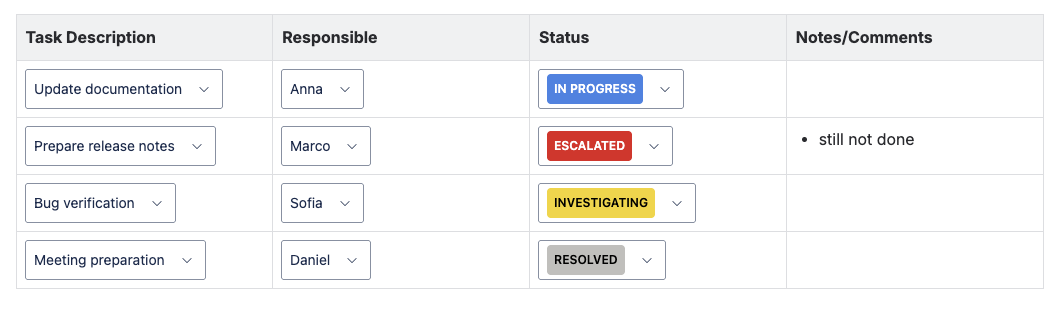
A single overview page shows all tasks planned for the current week.
For every task the team can immediately see:
-
who is responsible
-
what needs to be done
-
current progress
-
additional notes
The team updates the page continuously instead of maintaining multiple lists.
Weekly Plan | Image
Setup
1. Create the required dropdown sets
Open Easy Dropdown Menu → Global Configuration
Create the following predefined set:
Team Members
Add all people participating in the weekly planning.
Example:
-
Anna
-
Marco
-
Sofia
-
Daniel
Create the following status set:
Week Status
Represents the progress of a task.
Recommended values:
-
Planned
-
In Progress
-
Blocked
-
Done
2. Create the weekly planning page
Create a page named Weekly Plan – Calendar Week XX
Insert a table with 4 columns:
-
Task Description (text)
-
Responsible (dropdown)
-
Status (dropdown)
-
Notes (text)
3. Insert the dropdown fields
For each row:
-
In the Responsible column insert a Predefined Macro → select Team Members
-
In the Status column insert a Status Macro → select Week Status
Copy the row to create as many tasks as needed.
Daily Usage
During planning:
-
Add new rows for upcoming tasks
-
Assign a responsible person
-
Set the initial status to Planned
During the week:
-
Responsible users update the status
-
Add notes if something blocks progress
During stand-ups:
The team opens only this page to review all work.
Best Practice
Create a template from this page so a new weekly plan can be created every week without rebuilding the structure.