
We’ve released a major update to Easy Dropdown Menu as part of our move to Atlassian Forge, Atlassian’s modern cloud platform for apps. 🚀
Forge runs apps directly within Atlassian’s infrastructure, which improves security, reliability, and long-term compatibility with future Confluence updates.
Most things will continue to work as before, but some behaviors have changed after the update.
Please review the information below to ensure everything works smoothly in your instance.
EDM Filters and Usage Feature not working after update
If the EDM filters in Page Properties Reports or the Usage feature are not working after a recent update to version 4.0.0, this is caused by a known issue on Atlassian's side: CONFCLOUD-83926
After updating the app, Atlassian needs some time to re-index the content. As a result, EDM filters in Page Properties Reports and the Usage feature may not work immediately.
Please wait around one hour after the update. Once the indexing process is complete, the EDM filters and Usage feature should start working normally again.
EDM Values Are Not Indexed for Restricted Pages
EDM values are indexed to make them searchable in the Page Properties Report filter and the Usage feature. New values are indexed whenever the app receives a Page Created or Page Updated event.
On Forge, the app only receives page events for restricted pages if the app user has View permission for those pages. If the app user does not have access, the app is not notified about page changes, and any new or updated EDM values are not indexed. As a result, the search index may become out of sync with the page content.
This behavior is a current limitation of the Forge platform. We are tracking two public Atlassian issues that would address this limitation: ECO-961 and ECO-822.
Please grant the EDM app user View permission for any restricted pages with EDM macros. This ensures that the app receives page events and keeps the EDM index up to date.
Once Atlassian resolves one of the tracked issues, this should no longer be necessary.
Unable to get macro content: Failed to get macro: Error: getNodeWithPosByLocalId()
You will get this error when you try to edit the macro directly in the edit mode of the page after you have converted the Connect macro to Forge. You will get this error flag:
EDM Error Flag | Image
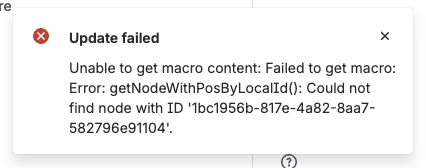
This issue is caused by a known issue on Atlassian’s side: CONFCLOUD-83319
We have found an easier workaround than the one described in the ticket:
After the macro has been converted to Forge (to convert it to the Forge storage format, open the macro editor and click Save), wait for the macro to finish re-rendering. Then cut the macro from the page and paste it back onto the same page.
For macros inside the Legacy Content Macro, this workaround does not work. To update the selected option, you need to edit the macro directly in the macro editor.
Status Macros are showing yellow color with black text
Only do this if you have status macros that are showing yellow background color with black text.
Reindexing
If you have this issue, please run Reindexing once for affected spaces.
Because of a bug from Connect and the changed behavior of how the macros are now working, it can happen that your status dropdown shows the wrong color.
Reindexing fixes this.
Behavior Changes
Macro behavior
The behavior of the macros on pages has changed.
The dropdown value will always be shown based on what is saved in the storage format of the page.
Connect macros (edit mode limitation)
Macros with Connect storage format cannot be changed directly in page edit mode. In order to edit the dropdown in the edit mode of the page you need to update the macro in the macro editor.
When opening a page, you may notice three different loading indicators:
-
The larger first loading spinner and the smaller second spinner, both displayed in the center of the macro, are provided by Atlassian. They appear while the page and its macros are being initialized.
Atlassian Loading Spinners | Images


-
The third and last spinner which is displayed on the left side of the macro is displayed by our app and reflects the app’s own loading time.
EDM Loading Spinner | Image

We have significantly improved the app’s performance by strengthening the caching mechanism. In rare cases, cached data may need to be refreshed manually. If you experience outdated or unexpected behavior, please use the Session Storage Clear in any macro editor to reset the cache.
Other important information
Macro Migration
The tab where the macro migration is running needs to stay open while it is in progress until it is finished. Otherwise, the macro migration will be aborted.
Reindexing
The tab where the reindexing is running needs to stay open while it is in progress until it is finished.
Otherwise, the macro migration will be aborted. You will now see the last successful reindexing for each space.
Connect Macros
All macros will continue to work as usual, no migration is needed.
CCMA Migration
During the CCMA, the current Cloud settings will be chosen over the imported Server settings.
If you want to change that behavior, you need to use the manual data migration.
CCMA (Confluence version requirement)
The CCMA will only work from Confluence 9 with EDM Version 7.0.8 or higher.
Older Confluence Server versions must use the manual migration.
Configuration location
The placement of the Global and Space Configuration of Easy Dropdown Menu has changed:
-
Global configuration → under Apps
-
Space configuration → under Integrations
Forge
Macros are not compatible with the legacy editor.
Improvements
-
Performance improvements
-
Caching
-
-
UI improvements
-
Settings
-
Macros/Dropdowns
-
Macro editors
-
-
Fixed different issues
Thank you ❤️
Thank you for using Easy Dropdown Menu and for your patience during this transition.
This update is an important step towards a more stable and future-proof app, and it enables upcoming features we’re already working on.
If anything feels unclear or not as expected, don’t hesitate to reach out, we’re here to help.
Need help?
If something looks wrong, doesn’t behave as expected, or you just have a question, feel free to contact us through our Service Desk.
To help us resolve your issue faster, please include:
-
steps to reproduce the issue
-
relevant information and context
-
a short description of what happened
-
screenshots or a screen recording (if available)
-
the page storage format
-
for migration issues: the log files
We’re happy to help 🙂