
Purpose
Assign tasks to team members directly inside a page without creating separate task pages.
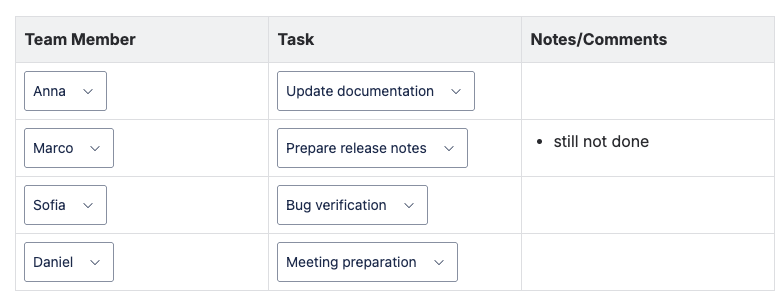
A table contains dropdown fields for responsible person and task.
This makes it immediately visible who is responsible for what.
Typical benefits:
-
Quick planning during meetings
-
Clear responsibilities
-
No external tools required
-
Easy updates by the whole team
Result
The page contains a normal Confluence table where:
-
the first column lets users select a team member
-
the second column lets users select a task
-
the third column is used for optional notes
All values are chosen from dropdown menus, so responsibilities stay consistent and easy to update.
Task assignment board | Image
Setup
1. Create a team member set
-
Open Easy Dropdown Menu → Global Configuration
-
Create a predefined set called Team Members
-
Add your team members, for example:
-
Anna
-
Marco
-
Sofia
-
Daniel
-
2. Create a task set
Create another predefined set called Tasks
Example options:
-
Update documentation
-
Prepare release notes
-
Customer follow-up
-
Bug verification
-
Meeting preparation
3. Create the assignment table
-
Create a new page called Task Assignment
-
Insert a normal Confluence table (3 columns recommended)
-
In the first column insert a Predefined Macro → select Team Members
-
In the second column insert a Predefined Macro → select Tasks
-
Leave the third column for notes or comments
-
Copy the row as often as needed
Usage
During planning meetings, the team only selects values from dropdowns.
No formatting or writing conventions are required.
Responsibilities stay clear and consistent because only predefined values can be selected.
Best Practice
Pin the page to the space sidebar so the team always updates the same central task board instead of creating multiple lists.