
Easy Confluence Translator always respects Confluence permissions. To create a translation, a user needs permission to view the source page and to add pages in the space where the translation is created. To delete a translation page, a user needs permission to delete pages in that space. The options below let you restrict further which users can create, edit or delete translations, or give users more rights in specific spaces. Only Confluence administrators can change these settings. For more information view our documentation on setting up permissions.
Permissions | Image
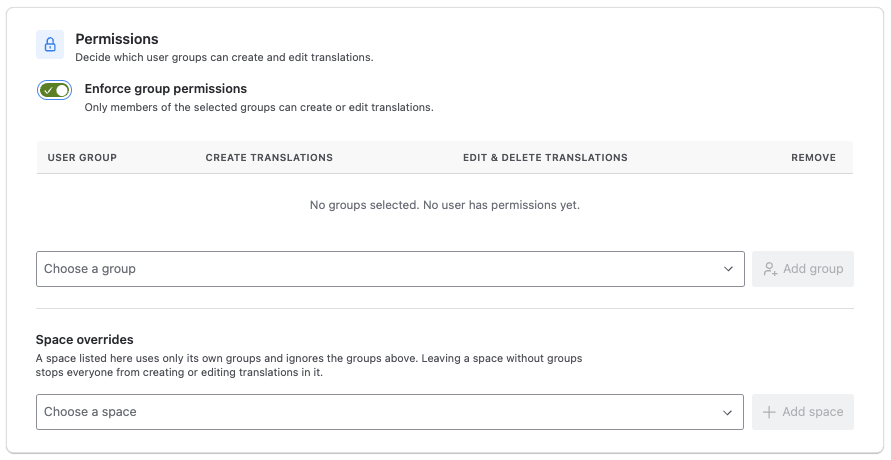
Enforce group permissions
If this option is enabled, only members of the selected user groups can create, edit or delete translations. Add a group with Add group, then choose per group:
-
Create translations: members can translate pages and update outdated translations.
-
Edit & delete translations: members can edit the text and attachments of a translation, and delete translations.
Space overrides
This section appears when Enforce group permissions is enabled. It lets you set different groups for individual spaces. A space listed here uses only its own groups and ignores the global groups above. If you list a space without adding any groups, nobody can create, edit or delete translations in it. Spaces are stored by their internal id, so renaming a space or changing its key does not affect its settings. Remove a space from the list to apply the global groups to it again.
Override Confluence permissions
This option is set per space in Space overrides. If it is enabled, the groups of that space can create and delete translations there even without the matching Confluence space permission. Reading the source page is never elevated: a user can only translate pages they are already allowed to open. Use this option, for example, to let a team publish translations into a space where they cannot create pages themselves.